April 26, 2026 · Clement Team
The Cold Email Deliverability Checklist (2026): 27 Checks Before You Hit Send
A step-by-step deliverability checklist for cold email in 2026, covering authentication, infrastructure, list hygiene, content, and reputation. Run it before every campaign.

Table of contents
Most “email deliverability checklists” you’ll find online were written for marketing newsletters in 2018. The thresholds, the rules, the reasoning — all of it was tuned for a different inbox-provider landscape. In 2026 that landscape has shifted, and a checklist that doesn’t account for it will quietly burn your sending domain.
This is the checklist we run internally before every cold-email campaign at Clement, updated for the post-Google/Yahoo-2024 sender world. Twenty-seven checks across five categories. Ship anything below 18 of 27 and you’re shipping a problem.
If you’d rather skip the manual auth checks, paste your domain into our free SPF/DKIM/DMARC checker — it covers the first eight items on the list in about a second.
What “deliverability” actually means in 2026
The first thing to clear up: “delivery rate” and “inbox placement” are not the same thing.
Delivery rate is the percentage of messages your sending platform accepted for delivery — i.e. didn’t bounce. A 99% delivery rate sounds good and means almost nothing. Mail can be “delivered” to a recipient’s mail server and sit in the spam folder forever, and your platform will still call it delivered.
Inbox placement is the percentage of accepted messages that actually landed in the inbox tab. This is the number that decides whether your campaign works. The gap between delivery rate and inbox placement is where most teams lose.
The three gates that decide inbox placement:
- Authentication — does the receiver believe this message is really from you?
- Reputation — does the receiver think mail from this domain and IP is wanted?
- Content & engagement — does the message look like wanted mail, and do humans engage with it?
You can ace one and lose the other two and still end up in spam. The checklist that follows works on all three.
Why Google + Yahoo’s February 2024 rules changed the floor
In February 2024, Google and Yahoo jointly published new sender requirements. The headline rules:
- Bulk senders (5,000+ messages/day to Gmail) must publish SPF, DKIM, and DMARC.
- One-click unsubscribe (RFC 8058) is required for bulk senders.
- The spam-reporting threshold is now ~0.3%. Cross it and the entire sending domain is throttled.
Cold email volume usually sits below the 5,000/day “bulk” threshold per inbox, but the smaller-sender path is being progressively tightened too. The practical floor for cold senders in 2026: assume bulk-sender rules apply to you, because they functionally will within 12 months.
Why most cold email deliverability advice is outdated
Five blind spots show up over and over in older guides.
The “warmup tools fix everything” myth. Automated warmup networks worked in 2019. Inbox providers have spent five years building detectors specifically for them. Pure automated warmup signals get you flagged faster than no warmup at all.
Confusing open rates with inbox placement. Apple’s Mail Privacy Protection has been pre-fetching pixel opens since 2021. Your 80% open rate is probably ~30% real opens plus a wall of MPP pre-fetches. Inbox placement tests are the only reliable signal.
Sending from your apex domain. If your one outreach campaign torches yourcompany.com’s reputation, your CEO can no longer send invoices. Every modern cold-email setup uses a sending subdomain (mail.yourcompany.com) or a separate sending domain entirely.
Treating DMARC as optional. Pre-2024, plenty of sites had no DMARC and shipped fine. Post-2024, missing DMARC is one of the fastest ways into the spam folder for any non-trivial volume.
Believing “good copy” can save bad infrastructure. It can’t. The receiving server runs the auth checks before any human ever sees the subject line.
The 27-check pre-send checklist
Run through this before every campaign — at minimum, before each new sending domain goes live and any time you cross a volume threshold.
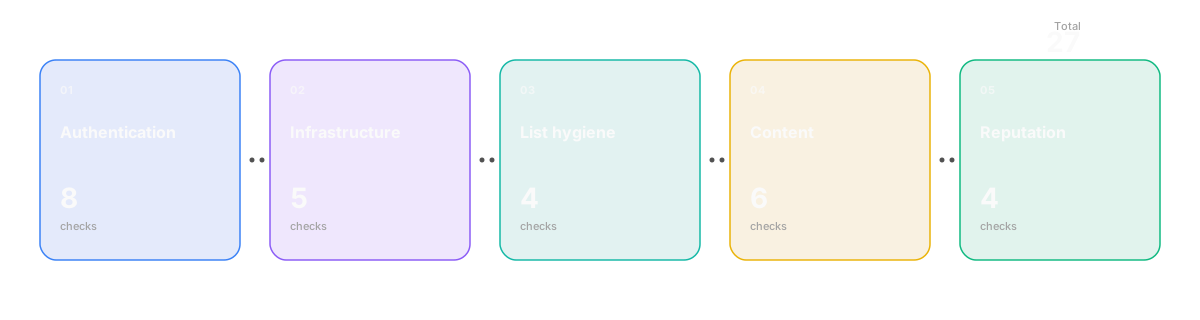
Domain & authentication (8 checks)
- You’re using a sending subdomain, not the apex. Send from
mail.yourcompany.comoroutreach.yourcompany.com, notyourcompany.com. Reputation damage stays scoped. - SPF record is published. A single TXT record on the sending domain starting with
v=spf1. - SPF ends in
~allor-all. Never+all(authorises everyone), and?allis a polite way to tell receivers “we have no opinion” — useless. - SPF stays under 10 DNS lookups. Every
include:,a,mx,exists, andredirectcounts. Cross 10 and the record permerrors. SPF flatteners help. - DKIM is signing every message. Sender-side problem: confirm in your sending platform that DKIM signing is enabled and the selector matches what’s in DNS.
- DKIM key is at least 2048-bit. 1024-bit is still accepted in 2026 but is the recommended floor to leave behind. New keys: 2048-bit.
- DMARC is published with a real policy.
v=DMARC1; p=quarantine; rua=mailto:...; pct=100for an established domain. Start atp=nonefor a brand-new one and ramp. - DMARC
rua=is set and someone is reading the reports. Without aggregate reports you have no way to see when a third party starts spoofing you. Free parsers: Postmark, dmarcian.
Verify these eight in one click: paste your sending domain into our SPF/DKIM/DMARC checker. It returns pass/warn/fail per record with plain-English fix hints. If anything fails, the step-by-step setup guide walks the fix.
Sending infrastructure (5 checks)
- Volume per inbox is capped. The conservative 2026 number for cold sending is 40–50 messages/day per inbox, ramped up over the warmup period. Past 60 you’re inviting trouble.
- You’re rotating across multiple inboxes/domains. A single inbox sending 200 messages/day looks very different to receivers than ten inboxes sending 20 each. The math is the same; the reputation outcome is not.
- The domain has been warmed for at least 14–21 days. A brand-new sending domain has zero reputation. Send 200 cold messages on day one and the domain is done.
- Bounce rate is under 2%. Anything above and most ESPs throttle automatically. Run list verification before sending, not after.
- Spam-complaint rate is under 0.1%. Google’s official threshold is 0.3%; reality is that you start losing inbox placement well before that. Watch Postmaster Tools.
List hygiene (4 checks)
- Every address has been verified. Use NeverBounce, ZeroBounce, MillionVerifier, or similar. Drop “risky” and “unknown” results, not just “invalid.”
- Catch-all domains are flagged separately. A catch-all domain accepts every address, valid or not. Catch-alls inflate “verified” counts and quietly raise bounce rates downstream.
- Role addresses are suppressed.
info@,support@,sales@,no-reply@rarely belong on a cold list. Strip them at import. - Disposable/temp domains are filtered. Mailinator, Guerrilla Mail, etc. They never engage and they sometimes report.
Content & engagement (6 checks)
- Subject line is 32–50 characters, no all-caps, no emoji. Modern spam filters care less about word lists and more about pattern signals — formatting tells.
- First-touch email is plain text, no HTML. A first cold email with a logo, multiple links, and a tracked image is doing a great job of triggering filters trained on marketing-style mail. Plain text reads as conversational and survives better.
- Zero or one link in the first email. If you must include a link, host it on a domain related to your sending domain — a brand-new tracking domain hurts.
- No spam-trigger phrases. The 2026 list is shorter than the 2010 list, but: “guarantee,” “click here,” “100% free,” and “limited time” still tank scores. Boring beats salesy.
- Personalisation goes beyond
{firstName}. Modern filters notice when 500 messages are identical except for a token. Personalise the first line; vary sentence structure. - One-click unsubscribe is present. RFC 8058 list-unsubscribe-post header. Mandatory for bulk senders, increasingly expected for any cold sender. Add it everywhere.
Reputation monitoring (4 checks)
- Google Postmaster Tools is enrolled for every sending domain. It’s the only direct view of how Google sees your reputation. Microsoft SNDS is the equivalent for Outlook/Hotmail.
- You check blacklists weekly. Spamhaus, Barracuda, SORBS, Sender Score. MXToolbox does this in one query. A single blacklist hit can crater inbox placement overnight.
- DMARC aggregate reports are being parsed. Either by a free service (Postmark, dmarcian) or a parser you run. Raw XML is unreadable by humans.
- You ran an inbox placement test before this campaign. GlockApps, MailGenius, or similar — send to a seed list and see what percentage hit Gmail’s inbox vs. spam vs. promotions vs. Outlook’s junk. If you’re below 80% inbox to Gmail, fix the underlying problem before scaling.
How to score your deliverability risk before you send
Counting passes is more useful than averaging pass-rates. Score each item 0 (fail) or 1 (pass), then read the band:
| Score | Verdict |
|---|---|
| 24–27 | Ship. |
| 18–23 | Ship at reduced volume; fix the gaps in parallel. |
| 12–17 | Don’t ship. Fix the failed checks first. |
| Under 12 | The campaign isn’t your problem. Rebuild the foundation. |
If you’re tempted to argue with the bands (“we’re at 16 but our copy is great”), remember: copy is a multiplier on inbox placement, not a substitute for it. A spam-foldered email with great copy still doesn’t get read.
You can also weight the checks. The eight authentication checks are non-negotiable — fail any of them and you should treat the whole campaign as red, regardless of total score. Reputation monitoring (the last four) is more recoverable; you can fix monitoring after launch as long as you launch into healthy infrastructure.
A real example: auditing a domain from scratch
To make this concrete, here’s how the audit looks for a fictional sending domain, outreach.acme.example.
Step 1 — Run the auth check. Paste the domain into our SPF/DKIM/DMARC checker. For acme.example, the result comes back:
| Record | Status | Note |
|---|---|---|
| SPF | Warn | Record exists, ends in ~all, but uses 9 of 10 lookups |
| DKIM | Pass | Selector google found, 2048-bit key |
| DMARC | Fail | p=none, rua= not set |
| MX | Pass | Google Workspace |
Two failures and a warning out of eight authentication checks. Score: 5/8.
Step 2 — Fix in priority order.
DMARC first — without rua= they have no visibility into who’s sending as them, and p=none means receivers don’t know what to do when SPF or DKIM fails. The fix is a single TXT record update; the setup guide walks it.
SPF next — the 9-of-10 lookup count means the record is one include: away from breaking. Flatten the longest include: chain (usually the marketing platform’s) so the team has headroom.
Step 3 — Walk infrastructure. Acme is sending from one inbox at 80 messages/day with no rotation. That’s the next failure: 50/day per inbox, two inboxes minimum. Bring on a second inbox, drop volume to 40 each, total stays at 80.
Step 4 — List hygiene. They run NeverBounce on import; catch-alls are mixed in. Flag them, drop the risky ones from this campaign.
Step 5 — Content. Subject lines are 60+ characters with emoji. Cut to 40, drop emoji.
Step 6 — Reputation monitoring. Postmaster Tools wasn’t enrolled. Enroll it now; it’ll start collecting data immediately.
Final score after fixes: 23/27. Ship at reduced volume for the first week, watch Postmaster Tools, ramp up.
Mistakes that quietly tank cold email deliverability
Patterns we see repeatedly when teams ask us to audit their setup.
Sending from the apex domain. “We don’t want to dilute the brand” is the usual reason. The dilution is real, but not the kind they think — the dilution is the apex domain’s reputation when one cold campaign goes wrong. Use a subdomain.
Treating warmup as a one-time event. Warmup is the first 14–21 days of a domain’s life, plus a permanent floor on how aggressively you can ramp volume. Doubling weekly volume on a “warmed” domain is still risky; receivers watch volume curves, not just absolute numbers.
Ignoring DMARC because “it’s just reporting.” It used to be. In 2026, missing DMARC is itself a negative signal — receivers infer the sender doesn’t know what they’re doing. Even p=none with a rua= is dramatically better than nothing.
Believing list-verification numbers blindly. Different verifiers disagree on the same address. Run two services and trust the more conservative one. Catch-all detection in particular varies wildly.
Confusing high open rates with high inbox placement. As covered above: Apple MPP eats this metric. The only way to know inbox placement is an inbox placement test.
Buying lists that look “verified.” No list bought from a third-party broker is clean. Even if the addresses resolve, the engagement signal is poison. Build lists from your own ICP work.
Jumping straight to DMARC p=reject. Receivers will reject mail. Plural. Including legitimate forwards. Always ramp: none → quarantine → reject, watching aggregate reports at each stage.
Tools that help (and what they replace)
Free tools cover most of what a small team needs.
Authentication & DNS — Our SPF/DKIM/DMARC checker covers the eight authentication checks. MXToolbox is the broader-toolbox alternative. dmarcian’s SPF surveyor is best-in-class for chasing 10-lookup-limit problems.
Reputation monitoring — Google Postmaster Tools (free, mandatory). Microsoft SNDS (free, more painful). Sender Score for an aggregated reputation number.
Inbox placement testing — GlockApps and MailGenius are the standard paid options. There’s no good free alternative; budget for one before scaling cold campaigns.
DMARC aggregate report parsing — Postmark’s free DMARC monitoring is enough for most senders. dmarcian’s free tier covers low-volume domains. Both are huge upgrades over reading raw XML.
List verification — NeverBounce, ZeroBounce, MillionVerifier. Most teams over-spend here; a single verifier is enough if you treat “risky” results as “drop” rather than “send anyway.”
How Clement fits in: we handle the sending infrastructure end of this list — per-inbox volume caps, reply-aware sequencing, conservative ramp curves — so the things you have to manually enforce in Mailshake or Smartlead become defaults. The authentication and content sides of the checklist are still your job, but with the right tool, the infrastructure side stops being a list of things you can forget.
Common questions about cold email deliverability
How long does it take to fix a bad sender reputation?
Faster than most people think for fresh damage, slower than anyone wants for accumulated damage. A single bad day with a too-aggressive send can be recovered in 2–3 weeks of conservative volume. A domain that’s been sending for six months at high spam-complaint rates often needs to be retired entirely; the new domain takes 14–21 days to warm but starts clean.
Can I cold email from G Suite / Google Workspace in 2026?
Yes, but with caveats. Google Workspace inboxes are excellent senders for low-volume cold (under 40/day per inbox, well-warmed). The friction shows up if you try to scale: a Workspace tenant sending high cold volume across many inboxes will eventually trigger Google’s own anti-abuse systems. For real scale, dedicated infrastructure (or platforms that abstract it) outperforms.
What’s a good cold email open rate in 2026?
Don’t optimise for open rate — Apple MPP makes it noise. Optimise for reply rate. Anything above 5% reply rate on a well-targeted list is healthy. 10%+ is excellent. Below 2% usually means a list problem, not a copy problem.
Should I use a dedicated IP for cold email?
For most teams, no. Dedicated IPs require enough volume to maintain reputation (~50,000+ messages/month sustained), and below that threshold a shared IP from a reputable provider is better than a cold dedicated IP. Dedicated IPs make sense at scale; “we want our own IP” is a vanity decision below ~10,000 messages/day.
Does DMARC p=reject break my cold email?
Only if your authentication isn’t actually aligned. If SPF and DKIM both pass and align with the From header, p=reject does nothing to your legitimate mail. The risk is that p=reject will reveal misalignment you didn’t know about — which is the point of ramping through p=none and p=quarantine first.
How many inboxes do I need for 200 cold emails per day?
At least four to five, ideally six. The 40–50/day per inbox cap is conservative on purpose. With four inboxes at 50 each, you have headroom for one to throttle without losing the day’s volume. Going below this ratio is the single most common mistake that tanks new programs.
Is email warmup actually necessary?
For a brand-new sending domain or a brand-new inbox on an established domain: yes, always. The 14–21 day ramp isn’t optional — receivers explicitly watch volume curves on new senders. The question isn’t whether to warm up; it’s whether to warm with an automated network (risky) or real conversations with friendly contacts (slower but durable). At Clement we’re firmly in the “real conversations” camp.
What changed with Google and Yahoo’s 2024 sender rules?
Three things: (1) DMARC became mandatory for bulk senders, (2) one-click unsubscribe via RFC 8058 became mandatory, and (3) the spam-reporting threshold was formalised at ~0.3%. The deeper change is the direction: smaller-sender thresholds are being progressively tightened toward bulk-sender thresholds, so the sensible play is to assume bulk-sender rules apply to you regardless of current volume.
The point of running this checklist isn’t to hit 27/27 every time. It’s to know what you’re shipping with. A campaign at 22/27 with eyes-open compromises will outperform a 27/27 campaign with one silent failure, every time.
If you haven’t already, run your sending domain through the SPF/DKIM/DMARC checker — that’s the fastest place to find the silent failures. If anything comes back red, the setup guide is the matching how-to.